


Kubernetes port-forward manager with interactive terminal UI
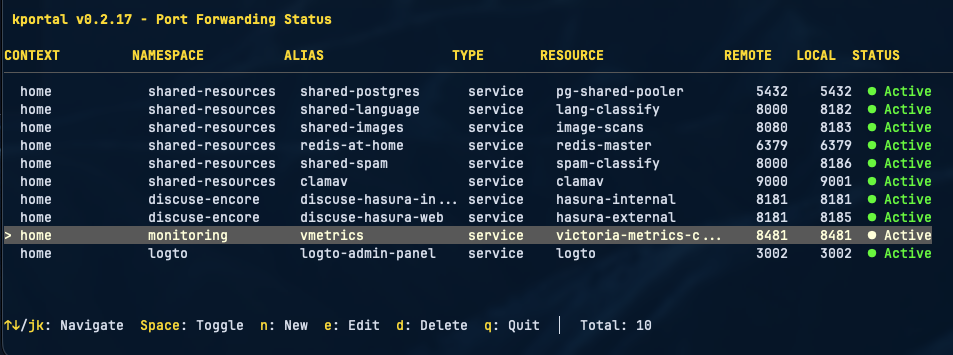
kportal manages multiple Kubernetes port-forwards with an interactive terminal interface. It provides real-time status updates, automatic reconnection, hot-reload configuration, and mDNS hostname publishing.
## ✨ Features
- **Interactive TUI** - Terminal interface with keyboard navigation
- **Live management** - Add, edit, and delete port-forwards without restarting
- **Auto-reconnect** - Exponential backoff retry on connection failures
- **Hot-reload** - Configuration changes applied automatically
- **Health monitoring** - Multiple check methods with stale connection detection
- **Multi-context** - Support for multiple Kubernetes contexts and namespaces
- **Pod restart handling** - Automatic reconnection when pods restart
- **Label selectors** - Dynamic pod targeting using label selectors
- **Port conflict detection** - Validates port availability with PID information
- **mDNS hostnames** - Access forwards via `.local` hostnames
- **HTTP traffic logging** - Real-time HTTP request/response logging for debugging
- **Connection benchmarking** - Built-in HTTP benchmarking with latency statistics
- **Headless mode** - Background operation for scripting and automation
## 🔄 Comparison with Other Tools
| Feature | kportal | [k9s](https://k9scli.io/) | [Kube Forwarder](https://kube-forwarder.pixelpoint.io/) | [kftray](https://kftray.app/) |
|---------|---------|------|----------------|--------|
| **Interface** | Terminal TUI | Terminal TUI | Desktop GUI (Electron) | Desktop GUI + TUI |
| **Persistent Config** | ✅ YAML file | ❌ Session only | ✅ JSON bookmarks | ✅ JSON + Git sync |
| **Auto-reconnect** | ✅ Exponential backoff | ❌ Manual | ✅ Basic | ✅ Watch API |
| **Hot-reload Config** | ✅ File watch + SIGHUP | ❌ | ❌ | ❌ |
| **Health Checks** | ✅ TCP + data-transfer | ❌ | ❌ | ❌ |
| **Stale Connection Detection** | ✅ Age + idle tracking | ❌ | ❌ | ❌ |
| **HTTP Traffic Logging** | ✅ Built-in viewer | ❌ | ❌ | ✅ |
| **Connection Benchmarking** | ✅ Built-in | ✅ Via Hey | ❌ | ❌ |
| **mDNS Hostnames** | ✅ `.local` domains | ❌ | ❌ | ❌ |
| **Label Selectors** | ✅ | ✅ | ❌ | ✅ |
| **Multi-context** | ✅ | ✅ | ✅ | ✅ |
| **Headless Mode** | ✅ | ❌ | ❌ | ❌ |
| **System Tray** | ❌ | ❌ | ❌ | ✅ |
| **UDP Support** | ❌ | ❌ | ❌ | ✅ Proxy relay |
| **Dependencies** | Single binary | Single binary | Electron | Tauri + kubectl |
## 📦 Installation
### Homebrew (macOS)
```bash
brew install --cask lukaszraczylo/taps/kportal
```
> **Note**: If you previously installed via `brew install lukaszraczylo/taps/kportal` (formula), uninstall first:
> ```bash
> brew uninstall kportal
> ```
### Quick Install
```bash
curl -fsSL https://raw.githubusercontent.com/lukaszraczylo/kportal/main/install.sh | bash
```
### Manual Download
Download binaries from the [releases page](https://github.com/lukaszraczylo/kportal/releases).
### Build from Source
```bash
git clone https://github.com/lukaszraczylo/kportal.git
cd kportal
make build && make install
```
### Verifying Release Signatures
All release checksums are signed with [cosign](https://github.com/sigstore/cosign) using keyless signing. To verify:
```bash
# Download the checksum file and its sigstore bundle from the release
cosign verify-blob \
--certificate-identity-regexp "https://github.com/lukaszraczylo/kportal/.*" \
--certificate-oidc-issuer "https://token.actions.githubusercontent.com" \
--bundle "kportal--checksums.txt.sigstore.json" \
kportal--checksums.txt
```
## 🚀 Quick Start
Create `.kportal.yaml`:
```yaml
contexts:
- name: production
namespaces:
- name: backend
forwards:
- resource: service/postgres
protocol: tcp
port: 5432
localPort: 5432
alias: prod-db
- resource: service/api
protocol: tcp
port: 8080
localPort: 8080
alias: api
httpLog: true # Enable HTTP traffic logging
```
Run:
```bash
kportal
```
### Keyboard Controls
| Key | Action |
|-----|--------|
| `↑↓` / `j/k` | Navigate |
| `Space` / `Enter` | Toggle forward |
| `n` | Add new forward |
| `e` | Edit forward |
| `d` | Delete forward |
| `b` | Benchmark connection |
| `l` | View HTTP logs |
| `q` | Quit |
## 📖 Configuration
### Basic Structure
```yaml
contexts:
- name:
namespaces:
- name:
forwards:
- resource: /
protocol: tcp
port:
localPort:
alias: # optional
selector: # optional
httpLog: true # optional - enable HTTP logging
```
### Forward Options
| Field | Required | Description |
|-------|----------|-------------|
| `resource` | Yes | Resource type and name (e.g., `service/postgres`, `pod/my-app`) |
| `protocol` | Yes | Protocol (`tcp`) |
| `port` | Yes | Remote port |
| `localPort` | Yes | Local port |
| `alias` | No | Display name and mDNS hostname |
| `selector` | No | Label selector for pod resolution |
| `httpLog` | No | Enable HTTP traffic logging (`true`/`false`) |
### Resource Formats
| Format | Description |
|--------|-------------|
| `service/name` | Service forwarding |
| `pod/name` | Direct pod by name |
| `pod/prefix` | Pod by prefix (matches `prefix-*`) |
| `pod` + `selector` | Pod by label selector |
| `deployment/name` | Deployment |
### Health Check Configuration
```yaml
healthCheck:
interval: "3s" # Check frequency
timeout: "2s" # Check timeout
method: "data-transfer" # tcp-dial or data-transfer
maxConnectionAge: "25m" # Reconnect before k8s timeout
maxIdleTime: "10m" # Detect idle connections
reliability:
tcpKeepalive: "30s"
dialTimeout: "30s"
retryOnStale: true
```
Health check methods:
- `tcp-dial` - Fast TCP connection test
- `data-transfer` - Verifies tunnel functionality by attempting data read
Connection age reconnection only triggers when the connection is also idle, preventing interruption of active transfers like database dumps.
### mDNS Hostnames
Enable mDNS to access forwards via `.local` hostnames:
```yaml
mdns:
enabled: true
contexts:
- name: production
namespaces:
- name: default
forwards:
- resource: service/postgres
port: 5432
localPort: 5432
alias: prod-db # Accessible via prod-db.local:5432
```
- Explicit `alias` becomes `.local`
- Without alias, hostname is generated from resource name (`service/redis` → `redis.local`)
- Works on macOS (Bonjour) and Linux (avahi-daemon)
Verify registration:
```bash
dns-sd -B _kportal._tcp local # macOS
avahi-browse -t _kportal._tcp # Linux
```
## Usage
### Interactive Mode
```bash
kportal
```
### Verbose Mode
```bash
kportal -v
```
### Headless Mode
Run without TUI for scripting and automation:
```bash
kportal -headless
```
Combines well with verbose mode for background operation:
```bash
kportal -headless -v &
```
### Validate Configuration
```bash
kportal --check
```
### Custom Config File
```bash
kportal -c /path/to/config.yaml
```
## Status Indicators
| Indicator | Description |
|-----------|-------------|
| `● Active` | Connection healthy |
| `○ Starting` | Initial connection (10s grace period) |
| `◐ Reconnecting` | Reconnecting after failure |
| `✗ Error` | Connection failed |
| `○ Disabled` | Manually disabled |
## Advanced Features
### HTTP Traffic Logging
Press `l` in the TUI to view real-time HTTP traffic for a selected forward. The log viewer shows:
| Column | Description |
|--------|-------------|
| TIME | Request timestamp |
| METHOD | HTTP method (GET, POST, etc.) |
| STATUS | Response status code |
| LATENCY | Request duration |
| PATH | Request path |
**List view shortcuts:**
| Key | Action |
|-----|--------|
| `↑/↓` | Navigate entries |
| `Enter` | View request details |
| `g/G` | Jump to top/bottom |
| `a` | Toggle auto-scroll |
| `f` | Cycle filter mode (All → Non-2xx → Errors) |
| `/` | Search by path or method |
| `c` | Clear all filters |
| `q` | Close log viewer |
**Detail view:**
Press `Enter` on any entry to see full request/response details including:
- Request and response headers (alphabetically sorted)
- Request and response bodies
- Timing information and status codes
| Key | Action |
|-----|--------|
| `↑/↓` | Scroll content |
| `PgUp/PgDn` | Scroll by page |
| `g` | Jump to top |
| `c` | Copy response body to clipboard |
| `Esc/q` | Return to list |
**Body display features:**
- **JSON formatting** - JSON bodies are pretty-printed with syntax highlighting
- **Compression handling** - gzip/deflate content is automatically decompressed
- **Binary detection** - Binary content shows a placeholder instead of garbled data
**Filter modes:**
- **All** - Show all entries
- **Non-2xx** - Hide successful (2xx) responses
- **Errors** - Show only 4xx and 5xx responses
### Connection Benchmarking
Press `b` in the TUI to benchmark a selected forward. Configure:
- **URL Path** - Target endpoint (default: `/`)
- **Method** - HTTP method (GET, POST, etc.)
- **Concurrency** - Number of parallel workers
- **Requests** - Total number of requests
Results include:
- Success/failure counts
- Min/Max/Avg latency
- P50/P95/P99 percentiles
- Throughput (requests/sec)
- Status code distribution
### Hot-Reload
Configuration changes are applied automatically. Manual reload:
```bash
kill -HUP $(pgrep kportal)
```
### Port Conflict Detection
kportal validates port availability at startup and during hot-reload, showing which process is using conflicting ports.
### Retry Strategy
Exponential backoff: 1s → 2s → 4s → 8s → 10s (max). Retries continue indefinitely until connection succeeds.
## Migration from kftray
```bash
kportal --convert configs.json --convert-output .kportal.yaml
```
## Signal Handling
- `Ctrl+C` / `SIGTERM` - Graceful shutdown
- `SIGHUP` - Reload configuration
## 🐛 Troubleshooting
### Port Already in Use
```bash
lsof -i :
kill
```
### Connection Refused
1. Verify pod is running: `kubectl get pods -n `
2. Verify port is correct: `kubectl describe pod `
3. Check service endpoints: `kubectl get endpoints `
### Context Not Found
```bash
kubectl config get-contexts
```
## 🔧 Development
### Prerequisites
- Go 1.23+
- Kubernetes cluster access
- kubectl configured
### Build
```bash
make build # Build binary
make test # Run tests
make all # fmt, vet, staticcheck, test
make install # Install locally
```
## Contributing
See [CONTRIBUTING.md](CONTRIBUTING.md) for guidelines.
## License
MIT License - see [LICENSE](LICENSE).
## Acknowledgments
- [Bubble Tea](https://github.com/charmbracelet/bubbletea) - Terminal UI framework
- [Lipgloss](https://github.com/charmbracelet/lipgloss) - Terminal styling
- [client-go](https://github.com/kubernetes/client-go) - Kubernetes client
- [kftray](https://github.com/hcavarsan/kftray) - Inspiration
## Links
- [Website](https://lukaszraczylo.github.io/kportal)
- [Issues](https://github.com/lukaszraczylo/kportal/issues)
- [Releases](https://github.com/lukaszraczylo/kportal/releases)
- [Changelog](CHANGELOG.md)