



Kubernetes port-forward manager with interactive terminal UI
kportal manages multiple Kubernetes port-forwards with an interactive terminal interface. It provides real-time status updates, automatic reconnection, hot-reload configuration, and mDNS hostname publishing.
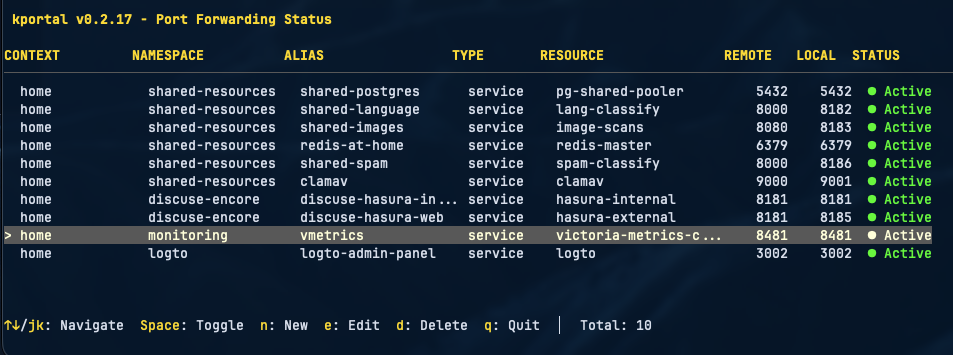
## ✨ Features
- **Interactive TUI** - Terminal interface with keyboard navigation
- **Live management** - Add, edit, and delete port-forwards without restarting
- **Auto-reconnect** - Exponential backoff retry on connection failures
- **Hot-reload** - Configuration changes applied automatically
- **Health monitoring** - Multiple check methods with stale connection detection
- **Multi-context** - Support for multiple Kubernetes contexts and namespaces
- **Pod restart handling** - Automatic reconnection when pods restart
- **Label selectors** - Dynamic pod targeting using label selectors
- **Port conflict detection** - Validates port availability with PID information
- **mDNS hostnames** - Access forwards via `.local` hostnames
## 📦 Installation
### Homebrew (macOS/Linux)
```bash
brew install lukaszraczylo/brew-taps/kportal
```
### Quick Install
```bash
curl -fsSL https://raw.githubusercontent.com/lukaszraczylo/kportal/main/install.sh | bash
```
### Manual Download
Download binaries from the [releases page](https://github.com/lukaszraczylo/kportal/releases).
### Build from Source
```bash
git clone https://github.com/lukaszraczylo/kportal.git
cd kportal
make build && make install
```
## 🚀 Quick Start
Create `.kportal.yaml`:
```yaml
contexts:
- name: production
namespaces:
- name: backend
forwards:
- resource: service/postgres
protocol: tcp
port: 5432
localPort: 5432
alias: prod-db
- resource: service/redis
protocol: tcp
port: 6379
localPort: 6379
```
Run:
```bash
kportal
```
### Keyboard Controls
| Key | Action |
|-----|--------|
| `↑↓` / `j/k` | Navigate |
| `Space` / `Enter` | Toggle forward |
| `a` | Add forward |
| `e` | Edit forward |
| `d` | Delete forward |
| `q` | Quit |
## 📖 Configuration
### Basic Structure
```yaml
contexts:
- name:
namespaces:
- name:
forwards:
- resource: /
protocol: tcp
port:
localPort:
alias: # optional
selector: # optional
```
### Forward Options
| Field | Required | Description |
|-------|----------|-------------|
| `resource` | Yes | Resource type and name (e.g., `service/postgres`, `pod/my-app`) |
| `protocol` | Yes | Protocol (`tcp`) |
| `port` | Yes | Remote port |
| `localPort` | Yes | Local port |
| `alias` | No | Display name and mDNS hostname |
| `selector` | No | Label selector for pod resolution |
### Resource Formats
| Format | Description |
|--------|-------------|
| `service/name` | Service forwarding |
| `pod/name` | Direct pod by name |
| `pod/prefix` | Pod by prefix (matches `prefix-*`) |
| `pod` + `selector` | Pod by label selector |
| `deployment/name` | Deployment |
### Health Check Configuration
```yaml
healthCheck:
interval: "3s" # Check frequency
timeout: "2s" # Check timeout
method: "data-transfer" # tcp-dial or data-transfer
maxConnectionAge: "25m" # Reconnect before k8s timeout
maxIdleTime: "10m" # Detect idle connections
reliability:
tcpKeepalive: "30s"
dialTimeout: "30s"
retryOnStale: true
```
Health check methods:
- `tcp-dial` - Fast TCP connection test
- `data-transfer` - Verifies tunnel functionality by attempting data read
Connection age reconnection only triggers when the connection is also idle, preventing interruption of active transfers like database dumps.
### mDNS Hostnames
Enable mDNS to access forwards via `.local` hostnames:
```yaml
mdns:
enabled: true
contexts:
- name: production
namespaces:
- name: default
forwards:
- resource: service/postgres
port: 5432
localPort: 5432
alias: prod-db # Accessible via prod-db.local:5432
```
- Explicit `alias` becomes `.local`
- Without alias, hostname is generated from resource name (`service/redis` → `redis.local`)
- Works on macOS (Bonjour) and Linux (avahi-daemon)
Verify registration:
```bash
dns-sd -B _kportal._tcp local # macOS
avahi-browse -t _kportal._tcp # Linux
```
## Usage
### Interactive Mode
```bash
kportal
```
### Verbose Mode
```bash
kportal -v
```
### Validate Configuration
```bash
kportal --check
```
### Custom Config File
```bash
kportal -c /path/to/config.yaml
```
## Status Indicators
| Indicator | Description |
|-----------|-------------|
| `● Active` | Connection healthy |
| `○ Starting` | Initial connection (10s grace period) |
| `◐ Reconnecting` | Reconnecting after failure |
| `✗ Error` | Connection failed |
| `○ Disabled` | Manually disabled |
## Advanced Features
### Hot-Reload
Configuration changes are applied automatically. Manual reload:
```bash
kill -HUP $(pgrep kportal)
```
### Port Conflict Detection
kportal validates port availability at startup and during hot-reload, showing which process is using conflicting ports.
### Retry Strategy
Exponential backoff: 1s → 2s → 4s → 8s → 10s (max). Retries continue indefinitely until connection succeeds.
## Migration from kftray
```bash
kportal --convert configs.json --convert-output .kportal.yaml
```
## Signal Handling
- `Ctrl+C` / `SIGTERM` - Graceful shutdown
- `SIGHUP` - Reload configuration
## 🐛 Troubleshooting
### Port Already in Use
```bash
lsof -i :
kill
```
### Connection Refused
1. Verify pod is running: `kubectl get pods -n `
2. Verify port is correct: `kubectl describe pod `
3. Check service endpoints: `kubectl get endpoints `
### Context Not Found
```bash
kubectl config get-contexts
```
## 🔧 Development
### Prerequisites
- Go 1.23+
- Kubernetes cluster access
- kubectl configured
### Build
```bash
make build # Build binary
make test # Run tests
make all # fmt, vet, staticcheck, test
make install # Install locally
```
## Contributing
See [CONTRIBUTING.md](CONTRIBUTING.md) for guidelines.
## License
MIT License - see [LICENSE](LICENSE).
## Acknowledgments
- [Bubble Tea](https://github.com/charmbracelet/bubbletea) - Terminal UI framework
- [Lipgloss](https://github.com/charmbracelet/lipgloss) - Terminal styling
- [client-go](https://github.com/kubernetes/client-go) - Kubernetes client
- [kftray](https://github.com/hcavarsan/kftray) - Inspiration
## Links
- [Website](https://lukaszraczylo.github.io/kportal)
- [Issues](https://github.com/lukaszraczylo/kportal/issues)
- [Releases](https://github.com/lukaszraczylo/kportal/releases)
- [Changelog](CHANGELOG.md)