

Kubernetes Port-Forward
Manager
Terminal interface for managing multiple Kubernetes port-forwards with auto-reconnect, hot-reload, health monitoring, and mDNS hostnames.


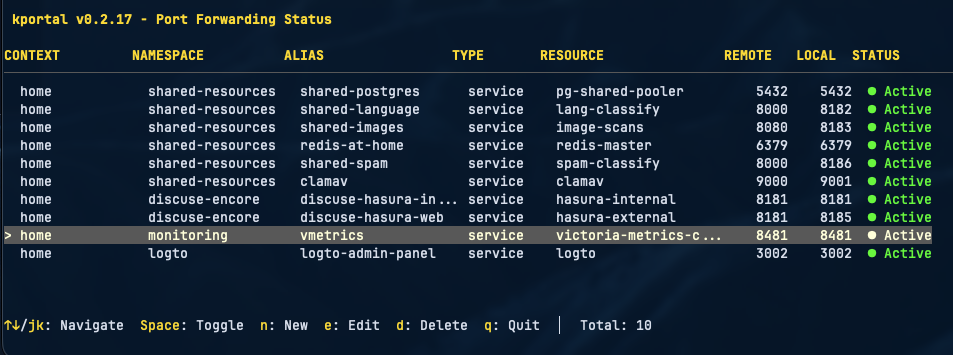
Terminal interface for managing multiple Kubernetes port-forwards with auto-reconnect, hot-reload, health monitoring, and mDNS hostnames.
Everything you need for production-grade port-forwarding
Beautiful terminal interface with real-time updates and keyboard navigation
Add, edit, delete, and toggle port-forwards without restarting
Exponential backoff retry with infinite retries on connection failures
Configuration changes applied automatically without restart
Multiple check methods with stale connection detection
Access forwards via .local hostnames without /etc/hosts
Manage forwards across multiple clusters and namespaces
Automatic reconnection when pods restart or reschedule
Validates port availability with process ID information
Real-time HTTP logging with filters (Non-2xx, Errors, Search)
Built-in HTTP benchmarking with latency percentiles
Background operation for scripting and automation
Get started in seconds
macOS & Linux
brew install lukaszraczylo/brew-taps/kportal
All platforms
curl -fsSL https://raw.githubusercontent.com/lukaszraczylo/kportal/main/install.sh | bash
Linux, macOS, Windows (amd64 & arm64)
Simple commands, powerful results
kportal
Launch the interactive TUI with real-time status updates and keyboard controls.
kportal -v
Run with detailed logging for debugging and automation.
kportal --check
Validate configuration without starting any forwards.
kportal -c /path/to/config.yaml
Use a custom configuration file instead of .kportal.yaml
kportal -headless -v &
Run without TUI for scripting and background operation.
Simple YAML configuration with powerful options
contexts:
  - name: production
    namespaces:
      - name: backend
        forwards:
          - resource: service/postgres
            protocol: tcp
            port: 5432
            localPort: 5432
            alias: prod-db

          - resource: pod/nginx
            protocol: tcp
            port: 80
localPort: 8080mdns:
enabled: true
healthCheck:
interval: "3s"
method: "data-transfer"
maxConnectionAge: "25m"
contexts:
- name: production
namespaces:
- name: default
forwards:
- resource: service/postgres
port: 5432
localPort: 5432
alias: db # db.localservice/name Servicepod/name Pod by namepod/prefix Pod by prefixdeployment/name Deploymentresource: podselector: app=nginxresource - Target resourceport - Remote portlocalPort - Local portalias - Display name & mDNSselector - Label selectorProduction-ready capabilities
Advanced health monitoring prevents stale connections during long operations like database dumps.
Access forwards via .local hostnames without editing /etc/hosts.
alias: prod-db
→
prod-db.local
service/redis
→
redis.local
Works on macOS (Bonjour) and Linux (avahi-daemon)
Configuration changes are applied automatically without restarting.
Exponential backoff with infinite retries ensures reliability.
Press l to view real-time HTTP traffic for debugging.
Press b to benchmark a connection with configurable parameters.