

11 KiB
graphql monitoring proxy
Creates a passthrough proxy to a graphql endpoint(s), allowing you to analyse the queries and responses, producing the Prometheus metrics at a fraction of the cost - because, as we know - $0 is a fair price.
This project is in active use by telegram-bot.app, and was tested with 30k queries per second on a single instance, consuming 10 MB of RAM and 0.1% CPU.
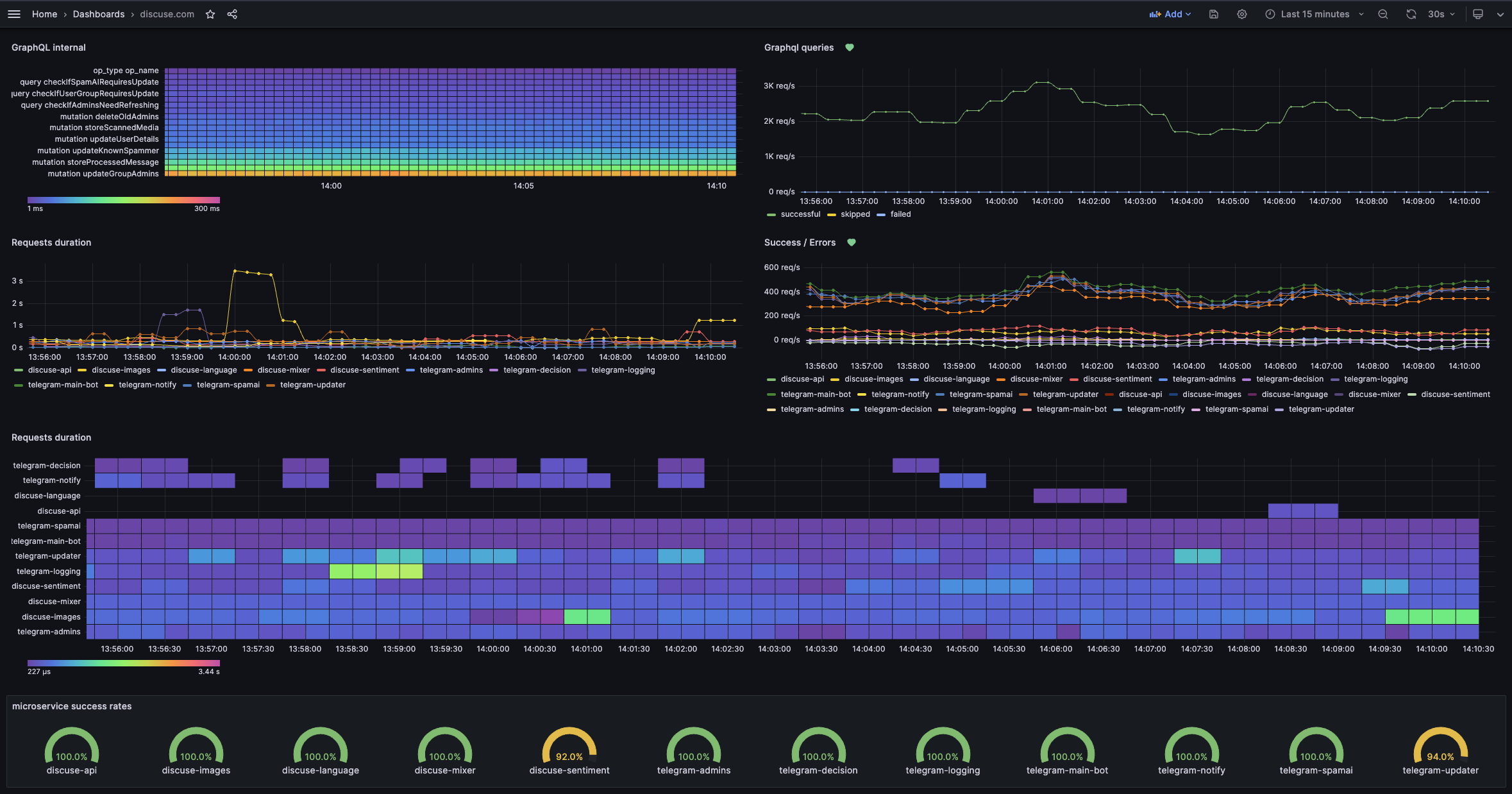
You can find the example of the Kubernetes manifest in the example deployment file.
Why this project exists
I wanted to monitor the queries and responses of our graphql endpoint. Still, we didn't want to pay the price of the graphql server itself ( and I will not point fingers at a particular well-known project), as monitoring and basic security features should be a standard, free functionality.
Endpoints
:8080/*- the graphql passthrough endpoint:9393/metrics- the prometheus metrics endpoint:8080/healthz- the healthcheck endpoint:8080/livez- the liveness probe endpoint:9090/api/*- the monitoring proxy API endpoint
Features
| Category | Detail |
|---|---|
| monitor | Prometheus / VictoriaMetrics metrics |
| monitor | Extracting user id from JWT token and adding it as a label to metrics |
| monitor | Extracting the query name and type and adding it as a label to metrics |
| monitor | Calculating the query duration and adding it to the metrics |
| speed | Caching the queries, together with per-query cache and TTL |
| security | Blocking schema introspection |
| security | Rate limiting queries based on user role |
| security | Blocking mutations in read-only mode |
| security | Allow access only to listed URLs |
| security | Ban / unban specific user from accessing the application |
Configuration
| Parameter | Description | Default Value |
|---|---|---|
MONITORING_PORT |
The port to expose the metrics endpoint | 9393 |
PORT_GRAPHQL |
The port to expose the graphql endpoint | 8080 |
HOST_GRAPHQL |
The host to proxy the graphql endpoint | http://localhost/ |
HEALTHCHECK_GRAPHQL_URL |
The URL to check the health of the graphql endpoint | `` |
JWT_USER_CLAIM_PATH |
Path to the user claim in the JWT token | `` |
JWT_ROLE_CLAIM_PATH |
Path to the role claim in the JWT token | `` |
ROLE_FROM_HEADER |
Header name to extract the role from | `` |
ROLE_RATE_LIMIT |
Enable request rate limiting based on role | false |
ENABLE_GLOBAL_CACHE |
Enable the cache | false |
CACHE_TTL |
The cache TTL | 60 |
LOG_LEVEL |
The log level | info |
BLOCK_SCHEMA_INTROSPECTION |
Blocks the schema introspection | false |
ALLOWED_INTROSPECTION |
Allow only certain queries in introspection | `` |
ENABLE_ACCESS_LOG |
Enable the access log | false |
READ_ONLY_MODE |
Enable the read only mode | false |
ALLOWED_URLS |
Allow access only to certain URLs | /v1/graphql,/v1/version |
ENABLE_API |
Enable the monitoring API | false |
API_PORT |
The port to expose the monitoring API | 9090 |
BANNED_USERS_FILE |
The path to the file with banned users | /go/src/app/banned_users.json |
Speed
Caching
The cache engine is enabled in the background by default, using no additional resources.
You can then start using the cache by setting the ENABLE_GLOBAL_CACHE environment variable to true - which will enable the cache for all queries without introspection. You can leave the global cache disabled and enable the cache for specific queries by adding the @cached directive to the query.
In the case of the @cached you can add additional parameters to the directive which will set the cache for specific queries to the provided time.
For example, query MyCachedQuery @cached(ttl: 90) .... will set the cache for the query to 90 seconds.
Security
Role-based rate limiting
You can rate limit requests using the ROLE_RATE_LIMIT environment variable. If enabled, the proxy will rate limit the requests based on the role claim in the JWT token. You can then provide the JSON file in the following format to specify the limits.
The default interval is second, but you can use other values as well. If you want to disable the rate limiting for a specific role, you can set the req to 0.
Available values:
nano, micro, milli, second, minute, hour, day
To define path in JWT token where the current user role is present, use the JWT_ROLE_CLAIM_PATH environment variable.
You can also set up the ROLE_FROM_HEADER environment variable to extract the role from the header instead of the JWT token. This is useful if you want to rate limit the requests for unauthenticated users. It's worth mentioning that ROLE_FROM_HEADER takes a priority over the JWT_ROLE_CLAIM_PATH environment variable and if its set, the proxy will not try to extract the role from the JWT token.
Default/sample configuration:
{
  "ratelimit": {
      "admin": {
          "req": 100,
          "interval": "second"
      },
      "guest": {
          "req": 50,
          "interval": "minute"
      },
      "-": {
          "req": 100,
          "interval": "day"
      }
  }
}
If you'd like to change it - mount your configmap as /app/ratelimit.json file.
Remember to include the - role, which is used for unauthenticated users or when claim can't be found for any reason.
If rate limit has been reached - the proxy will return 429 Too Many Requests error.
Read-only mode
You can enable the read-only mode by setting the READ_ONLY_MODE environment variable to true - which will block all the mutation queries.
Allowing access to listed URLs
You can allow access only to certain URLs by setting the ALLOWED_URLS environment variable to a comma-separated list of URLs. If enabled - other URLs will return 403 Forbidden error and request will not reach the proxied service.
Blocking introspection
You can block the schema introspection by setting the BLOCK_SCHEMA_INTROSPECTION environment variable to true - which will block all the queries with introspection parts, like:
__schema, __type, __typename, __directive, __directivelocation, __field, __inputvalue, __enumvalue, __typekind, __fieldtype, __inputobjecttype, __enumtype, __uniontype, __scalars, __objects, __interfaces, __unions, __enums, __inputobjects, __directives
If you'd like to keep blocking of the schema introspection on but allow one or more of from the list of above for any reason, you can use the ALLOWED_INTROSPECTION environment variable to specify the list of allowed queries.
ALLOWED_INTROSPECTION="__typename,__type"
API endpoints
Ban or unban the user
Your monitoring system can detect user misbehaving, for example trying to extract / scrap the data. To prevent user from doing so you can use the simple API to ban the user from accessing the application.
To do so - you need to enable the api by setting env variable ENABLE_API=true which will expose the API on the port API_PORT=9090. Nedless to say - keep it secure and don't expose it outside of your cluster.
Then you can use the following endpoints:
POST /api/user-ban- ban the user from accessing the applicationPOST /api/user-unban- unban the user from accessing the application
Both endpoints require the user_id parameter to be present in the request body and allow you to provide the reason for the ban.
Example request:
curl -X POST \
  http://localhost:9090/api/user-ban \
  -H 'Content-Type: application/json' \
  -d '{
      "user_id": "1337",
      "reason": "Scraping data"
    }'
Ban details will be stored in the banned_users.json file, which you can mount as a file or configmap to the /go/src/app/banned_users.json path ( or use BANNED_USERS_FILE environment variable to specify the path to the file). The file operation is important if you have multiple instances of the proxy running, as it will allow you to ban the user from accessing the application on all instances.
General
Healthcheck
If you'd like the /healthz endpoint to perform actual check for the connectivity to the graphql endpoint - set the HEALTHCHECK_GRAPHQL_URL environment variable to the exact URL of the graphql endpoint. The query executed will be query { __typename } and if the response is not 200 OK - the healthcheck will fail.
Monitoring endpoint
Example metrics produced by the proxy:
graphql_proxy_timed_query_bucket{cached="false",user_id="-",op_type="mutation",op_name="updateUserDetails",vmrange="1.000e-02...1.136e-02"} 6
graphql_proxy_timed_query_count{op_name="",cached="false",user_id="-",op_type=""} 78
graphql_proxy_timed_query_bucket{op_name="MyQuery",cached="false",user_id="-",op_type="query",vmrange="5.995e+00...6.813e+00"} 1
graphql_proxy_timed_query_sum{op_name="MyQuery",cached="false",user_id="-",op_type="query"} 6
graphql_proxy_timed_query_count{op_name="MyQuery",cached="false",user_id="-",op_type="query"} 1
graphql_proxy_executed_query{user_id="-",op_type="mutation",op_name="updateKnownSpammer",cached="false"} 1486
graphql_proxy_executed_query{user_id="-",op_type="query",op_name="checkIfAdminsNeedRefreshing",cached="false"} 13167
graphql_proxy_executed_query{user_id="1337",op_type="query",op_name="checkIfKnownMedia",cached="false"} 429
graphql_proxy_executed_query{user_id="-",op_type="query",op_name="checkIfSpamAIRequiresUpdate",cached="false"} 8891
graphql_proxy_requests_failed 324
graphql_proxy_requests_skipped 0
graphql_proxy_requests_succesful 454823